
The short version
- Keep each item's photos and notes together, then review the prepared drafts.
- Connect your existing eligible eBay seller account; Snap supports individual fixed-price listings.
- For an auction or a listing with size or color variations, use eBay’s own listing tools.
Photograph several items on Android, keep each item’s photos and notes together, then review the prepared eBay drafts. Listalong Snap suits a mixed haul of jackets, boots and electronics when you want to keep taking photos before checking the listings. We make Snap; eBay’s own app is also a useful option, particularly for a straightforward item with a matching barcode.
- Who it suits: US eBay sellers preparing several different items as individual, fixed-price listings.
- What you need: a compatible Android phone, a Listalong login and a connected eBay seller account. You can connect an existing eligible eBay account.
- What costs money: draft generation uses credits. Eligible accounts receive 300 welcome credits, once per eBay seller account. Credits are not listings; further generation can require paid top-ups. Snap has no recurring subscription, and eBay selling fees are separate.

Using iPhone instead? Get Snap from the US App Store or read the iPhone setup guide for US and Australian sellers.
See the photos stay with the editable draft
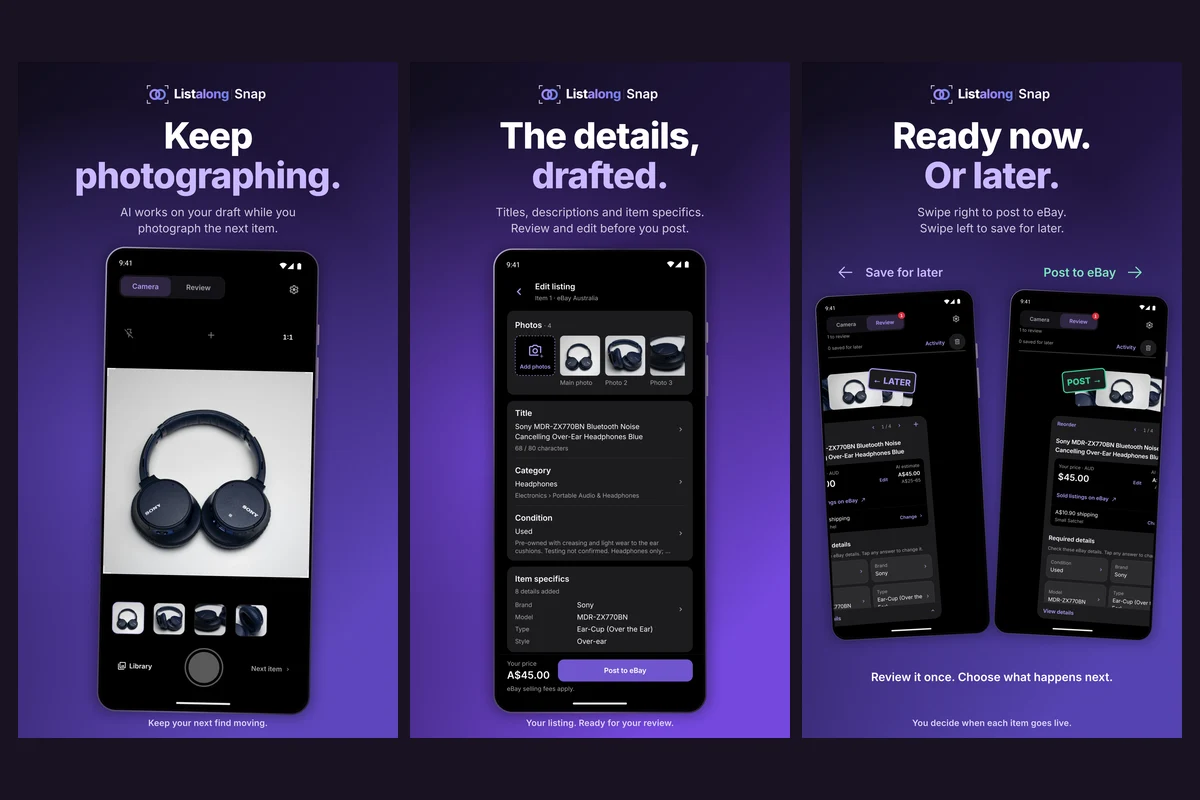
Android product artwork: the headphone photo group leads into editable title, condition and item-specific fields, then review. The pictured A$45 is an Australian item’s asking price, not a US price or app fee. Open the full-size Android example to read the fields.
The sequence is capture, review, then publish or save for later. You can generate after the batch or enable generation after each item while you keep photographing. Watch the Android product demo; it uses sample items with simulated AI generation and posting.
Before the first US listing: account, USD and shipping
Connect your seller account and confirm eBay US, the stock’s actual city/state/ZIP code, and your shipping and returns defaults. Snap shows US listing prices as US$. Check the packed weight and dimensions before relying on a saved shipping setting.
For a thrift-store jacket marked “M,” photograph the label and add the flat chest and back length in inches if those are the measurements you took. A suggested US$45 asking price is an editable listing decision, not a valuation or a Snap fee.
Selling from Australia? Snap supports eBay Australia, with AUD prices and suburb/postcode details. See the Australian eBay-app comparison and Australian Android cost guide. This guide’s shipping examples assume US stock.
Take a jacket, boots and controller through one batch
- Jacket: photograph the front, back, brand/size label, fabric label and worn cuff. Add an illustrative note such as “Flat chest 22 inches; cuff mark photographed; zipper checked,” using your own observations.
- Boots: tap Next item first. Capture the size stamp, soles and heels, and note replacement insoles or a missing box. Verify the sizing system rather than guessing from a bare “8.”
- Controller: start another item, photograph the model and included cable, and note which buttons, sticks, connection and charging functions you tested.
- Review: keep Snap open until uploads finish. Compare each draft with its photos and notes; check identity, condition, item specifics, asking price and shipping.
- Publish: submit the ready drafts and open their resulting eBay listings. If submission status is unclear, check eBay before submitting the same item again.
Already have the photos? The Android camera-roll guide covers importing one group at a time. The US photo-to-listing guide explains what each photo should show.
Choose eBay or Snap for the job
| Your next task | A useful starting point |
|---|---|
| A boxed board game with a readable barcode | eBay’s mobile catalog match; verify the edition and contents |
| Several unrelated used items with different flaws | Snap’s grouped photos, notes and draft review |
| An auction or selectable size/color variations | eBay’s own listing tools |
| Start on a phone and finish on a computer | eBay’s cross-device draft workflow |
The official eBay mobile guide documents creating/editing, barcode matching, photos and cross-device drafts. Check the AI suggestions available in your account too. Snap offers a different way to organize the batch, not a replacement for every eBay task.
Download and check the credit price
Google Play shows the top-up price and currency before purchase. Editing and posting a generated draft use no additional credits. See the pay-as-you-go cost guide for the calculation.
Get Snap for Android and prepare your next batch. Snap creates eligible eBay listings without a Listalong crosslisting subscription. Crosslisting to another marketplace has separate account and marketplace eligibility.
Reviewed November 16, 2026 using the linked eBay instructions, product information and store listings. Examples are illustrative; no measured speed comparison is claimed.
Common questions
Does Snap work with my existing US eBay seller account?
Yes. Connect your eBay seller account to Snap and confirm your marketplace, item location, shipping, and return settings. A Listalong crosslisting subscription is not required for creating eBay listings. Any crosslisting access has separate eligibility.
Does using Snap add a fee every time I edit a price?
Editing and posting use no additional generation credits. Draft generation uses credits. Google Play shows the price and currency before a credit top-up.